
RunBridge Firmware Updates
Firmware updates are not available for public download. They are provided by support as needed on an individual basis. Most customers never need a firmware change unless support asks you to install one for compatibility or diagnostics.
These steps require a Windows or Mac computer and a reliable USB data connection to RunBridge. A built-in USB port (A or C) or a reliable adapter both work—many laptops only have USB-C, which is fine with a good cable and dongle. Phones and tablets are not recommended for copying .uf2 files or using the Extractor.
RunBridge uses a Seeed XIAO nRF52840 module. Updating firmware means copying a single .uf2 file to the board’s UF2 bootloader drive (it is not a normal USB stick).
Before you start
- You have the .uf2 file from support (download or email attachment).
- Use a USB cable that supports data (many are charge-only) and a reliable adapter if your computer needs one; avoid flaky hubs if you can.
- To check the firmware version afterward, use Chrome or Edge on a desktop with the Extractor page (see below).
Signs the update likely worked: the bootloader drive disappears from File Explorer or Finder, and RunBridge reconnects for normal use (you may hear the usual USB connect sound on Windows). If the drive never appears or the file never transfers, try the steps under Troubleshooting—not every “error” means a problem.
Reset button (all computers)
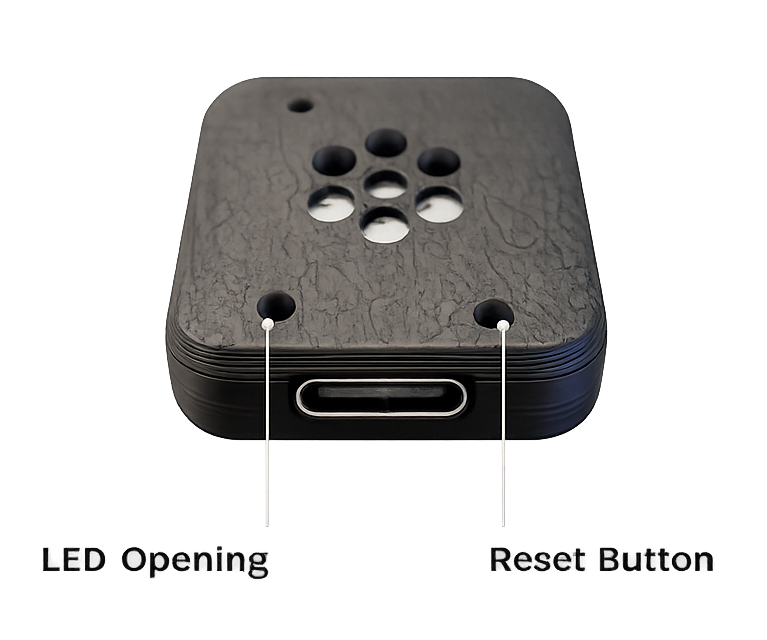
Double-tap Reset means press the small Reset button twice quickly (about as fast as a double-click). Use something gentle that won’t scratch the board—a toothpick, plastic pick, or similar. If you are too slow, the board just reboots normally; try again with two quicker taps.
Windows
- Save the .uf2 file somewhere easy to find, such as Downloads or your Desktop. If you downloaded it from email and Windows “blocked” it: right-click the file → Properties → check Unblock (if shown) → OK.
- Plug RunBridge into the PC. Open File Explorer (folder icon on the taskbar). Select This PC in the left sidebar so you can see drives.
- Double-tap Reset on RunBridge (see photo above). Within a few seconds, a new removable drive should appear. Its name can vary. Common examples include RUNBRIDGE or XIAO-SENSE, but use whichever new small drive appears right after the double-tap.
- Open that drive. Drag your .uf2 file into the window, or copy and paste it there. The drive contains a file named CURRENT.UF2. When Windows asks to replace that file, choose Replace—replacing CURRENT.UF2 with the firmware support sent you is normal, expected, and safe.
- Wait a moment. The drive may vanish while Windows still shows a copy dialog—see the yellow note above. If the drive disappears and RunBridge reconnects, the update probably succeeded even if Windows reported an error.
- After a short wait, the RGB LED should show a brief boot color cycle when the firmware starts. After that, the LED may be off until normal device activity begins (examples in LED States).
- If you never see that boot color cycle after USB power, unplug RunBridge, wait a few seconds, and plug it back in, then watch the LED again (this is more common on Mac but helps on Windows too).
macOS
- Save the .uf2 file to Downloads or Desktop.
- Plug RunBridge into your Mac. If macOS shows a prompt to allow or trust a new USB accessory, choose Allow (wording varies by macOS version). If you tapped Don’t Allow by mistake, open System Settings → General or Privacy & Security and look for USB or accessory settings to approve the device, or unplug and plug in again and allow when prompted.
- Open Finder. In the sidebar under Locations, watch for your Mac and any removable volumes.
- Double-tap Reset on RunBridge. Within a few seconds, a new volume should appear. Its name can vary. Common examples include RUNBRIDGE or XIAO-SENSE, but use whichever new volume appears right after the double-tap. If macOS asks again to allow a USB accessory, Allow—the bootloader looks like a different device to the system.
- Drag your .uf2 file onto that volume, or open the volume and copy the file inside. You may see a Finder message that the copy could not be completed; if the volume disappears and the device reconnects, the flash may still have succeeded (see the yellow note above).
- After updating, the RGB LED should show a brief boot color cycle when the firmware starts. After that, the LED may be off until normal device activity begins (examples in LED States).
- If you never see that boot color cycle, or you are unsure the update finished, unplug RunBridge, wait a few seconds, and plug it back in—macOS often needs this clean USB cycle—then check the LED again.
The Extractor does not install firmware—it only talks to RunBridge over USB so you can confirm the version and collect logs for support. After a successful update (and a USB replug on Mac if needed), you can confirm what is installed:
- Open the Extractor in Google Chrome or Microsoft Edge on a desktop computer (Web Serial is required).
- Plug in RunBridge and connect using the page’s connect button. When prompted, pick the serial device for RunBridge (names may mention RunBridge, nRF52, or USB serial).
- Expand Developer Tools (Serial Command). In the command box, type d and send it (or press Enter). The device streams a log dump; in that text, look for a line starting with RUNBRIDGE:v followed by the version, and lines such as [BOOT] RunBridge with the version number.
The Extractor’s command table describes d as a log dump—that output is where the firmware version appears. See Extractor for the full serial command reference.
- Bootloader drive never appears? Try the double-tap again (faster), a different USB cable (data-capable), and another USB port. Avoid flaky hubs if possible.
- Mac: drive missing after plugging in? Make sure you allowed the USB accessory when prompted (on first plug and again after double-tap Reset). Unplug, wait a few seconds, reconnect, and approve if asked.
- Copy “failed” but the drive disappeared? The update may have succeeded anyway; unplug/replug (especially on Mac) and check LEDs or verify with the Extractor d command.
- Replacing CURRENT.UF2? Yes. The bootloader drive shows a file named CURRENT.UF2. Replacing it with the .uf2 support gave you is expected and safe.
- Still in update mode after copying? If the small bootloader drive stays mounted and the RGB LED keeps the bootloader pulsing pattern instead of returning to normal RunBridge behavior (see LED States—especially the brief boot color cycle when the device starts), copy the same support-provided .uf2 onto that drive again—choose Replace if asked about CURRENT.UF2. If it still will not leave update mode, contact support.
- Still stuck? Contact support@runbridge.dev with what you tried and what you see on screen.
Internal developer tool — Hex to UF2 (not for customer firmware installs)
RunBridge engineering use only. Customers get ready-to-copy .uf2 files from support—do not use this tool unless you are building firmware from source. It converts raw Arduino .hex exports into UF2 for the nRF52840.
These notes describe firmware revisions support may reference when helping you. They are not a catalog of downloads—firmware files are only sent by support when appropriate.
Shipping reference: 4.0.1
📦 Version 4.0.1 – Current production firmware (May 2026)
This is the firmware installed on new RunBridge units. Version 4 is a major refresh focused on smoother real-world runs: working with more treadmills, improving speed and distance stability, and recovering more gracefully when Bluetooth interruptions happen.
What Version 4 improves
- Broader treadmill support. Updated Bluetooth treadmill handling, tested on more real-world models including Spirit, AssaultRunner, Technogym, and Horizon-style FTMS behavior.
- More dependable live data. RunBridge listens for speed and distance updates in a more reliable way so compatible treadmills can send workout data more consistently.
- Better handling of treadmill quirks. Some brands report speed, distance, or session data a little differently. Version 4 handles more of those differences to reduce freezes, dropouts, and distance drift.
- Smoother speed and distance. Refined filtering and session logic help reporting stay steady through belt starts, stops, and short gaps in treadmill data.
- Friendlier reconnects. Improved behavior when the treadmill, RunBridge, and your watch need to find each other again during setup or after an interruption.
- Customer-ready defaults. Standard firmware is tuned for normal use, with heavy diagnostic logging turned off so the device is not constantly writing debug data to internal storage.
If your RunBridge is already working normally, updating is optional. If you are having compatibility issues, Version 4.0.1 is the recommended firmware to install.
📦 Version 3.2.5 – Horizon FTMS parsing and motion stability (March 2026)
Improves reliability on treadmills that send short or alternating FTMS packets (including many Horizon models): odometer trust and distance sync are established more consistently, and motion state stays stable instead of flickering. Existing customers receive this build from support when recommended—not from a public download.
✨ Highlights
- Tolerant tail parsing. Truncated packets (e.g. speed and distance present but optional trailing fields cut off) are no longer dropped entirely; the parser continues so odometer trust and distance logic still run. Truncation is rate-limited in logs for support.
- Alternating zero-speed packets. When a packet has no odometer and reports zero speed, the bridge can hold the last non-zero speed if odometer trust is already set or there was recent motion—reducing Motion START/STOP flipping on alternating-packet treadmills.
- Rate-limited hold logs. Repeated “hold speed” messages are throttled so support logs stay readable on those treadmills.
- AvgSpeed truncation. If average-speed bytes are missing but the odometer is still present, parsing continues to the odometer instead of stopping early.
📦 Version 3.2.1 – Spirit fix, logging, distance (February 2026)
Improves compatibility with Spirit and similar treadmills; better logging and distance sync. Existing customers receive this build from support when recommended—not from a public download.
✨ Highlights
- Spirit treadmill compatibility fix (CCCD write behavior)
- Larger log files and archive for support diagnostics
- Odometer interpolation so watch distance tracks treadmill display more closely
📦 Version 3.1.3 – Initial shipping baseline (January 2026)
Baseline firmware for early RunBridge units; updates are issued by support when needed, not distributed as a public download.
✨ Features
- FTMS treadmill bridge for Garmin watches
- Real-time heart rate relay from watch to treadmill
- Automatic session summary logging
- Distance banking for mid-session odometer resets
- Early odometer capture for reliable session summaries
🔧 Technical Details
- Bluetooth Low Energy (BLE) dual-mode operation
- Built-in serial logging for debugging
- UF2 updates via USB when support provides a firmware file